

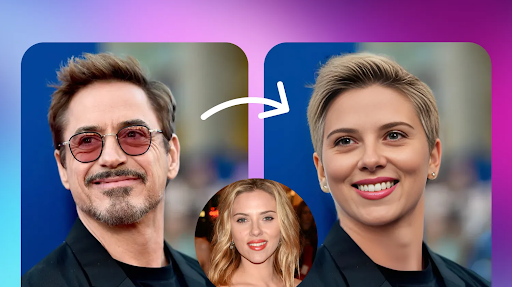
AI-powered photo and video editing has moved from novelty to necessity. Creators, marketers, and everyday users now rely on face swap AI and AI talking photo tools to make reaction videos, personalized greetings, dubbed content, and social clips in minutes instead of hours. The best platforms combine realistic facial mapping, natural lip sync, and fast rendering without demanding a professional editing background.
To help you choose the right one, we tested the most popular tools on the market in 2026, comparing pricing, output quality, ease of use, and unique features. Here’s our breakdown, starting with our top pick.
At a Glance
| Tool | Best For | Free Plan | Starting Paid Price |
| Magic Hour | Overall face swap & talking photo creation | Yes (credits never expire) | Creator: $19/mon or $12/mon billed annually; Pro — $39/month or $25/month billed annually |
| Reface | Quick mobile face swaps | Limited | $7.99/mon |
| DeepSwap | Video face swapping | Limited | $19.99/mon |
| HeyGen | AI avatars & talking photos | Limited | $29/mon |
| Vidnoz AI | Budget talking photo videos | Yes | $9.99/mon |
| Remaker AI | Simple photo face swaps | Yes | $9.90/mon |
1. Magic Hour — Best Face Swap AI and AI Talking Photo Platform
Magic Hour tops our list for good reason. It’s a full AI content studio built around face swap AI and AI talking photo generation, alongside video upscaling, lip sync, and template-based creation, all in one interface. Rather than juggling separate apps for swapping faces, animating photos, and polishing output, Magic Hour lets you move from raw image to finished video in a single connected workflow.
What sets it apart is depth combined with accessibility. You don’t need to sign up to try core features, and unlike most competitors, credits never expire once earned. Magic Hour gives users access to frontier AI models under one roof, so you’re not limited to a single proprietary engine. Its click-to-create templates and one-click multi-step workflows (generate → upscale → video) mean beginners can produce polished results without technical know-how, while power users can run parallel generations with no concurrency cap to test multiple takes quickly.
The platform ships new features weekly, keeping pace with a fast-moving industry, and its free tier is unusually generous compared to rivals that gate almost everything behind a paywall. It’s also built to perform well on both desktop and mobile, with reliable uptime even during traffic spikes or live activations. Teams building on top of the platform benefit from full API parity across tools, and users consistently mention founder-level support response times when issues do come up.
Pricing:
- Free — no cost to start
- Creator — $19/month or $12/month billed annually
- Pro — $39/month or $25/month billed annually
Main Features:
- Best-in-class face swap, lip sync, and talking photo generation
- No signup required to start creating
- Multiple frontier AI models accessible in one platform
- Multi-step automated workflows and fast variation generation
- Generous, credit-based free tier with no expiration
Drawbacks:
- The breadth of tools and models can feel overwhelming to first-time users
- Advanced features are reserved for paid tiers
2. Reface
Reface is a mobile-first app known for quick, meme-style face swaps in photos and short clips.
Pricing: Free with watermark; premium starts around $7.99/month.
Main Features: Instant swaps, large template library, social sharing tools.
Drawbacks: Limited to short clips, output quality drops on complex videos, and the free version adds a visible watermark.
3. DeepSwap
DeepSwap focuses specifically on video-based face swapping for longer-form content.
Pricing: Free trial with credit limits; plans start at $19.99/month.
Main Features: Multi-face detection, HD video output, browser-based editor.
Drawbacks: Rendering can be slow for longer videos, and the free trial offers very limited credits.
4. HeyGen
HeyGen is popular for AI avatars and talking photo videos aimed at marketing and training content.
Pricing: Free plan with watermark and limited minutes; paid plans start at $29/month.
Main Features: Realistic avatar generation, multilingual voice dubbing, script-to-video tools.
Drawbacks: Higher price point, and customization options are more limited outside enterprise plans.
5. Vidnoz AI
Vidnoz AI appeals to budget-conscious users who want simple talking photo videos without a steep learning curve.
Pricing: Free plan available; paid tiers start at $9.99/month.
Main Features: Photo-to-video animation, basic voice cloning, template presets.
Drawbacks: Output realism lags behind premium competitors, and advanced editing tools are minimal.
6. Remaker AI
Remaker AI is a lightweight option built for straightforward photo face swaps rather than full video production.
Pricing: Free plan with limits; paid plans start at $9.90/month.
Main Features: Fast photo swapping, batch processing, simple interface.
Drawbacks: No real video talking photo support, and results can look inconsistent on complex facial angles.
How We Choose These Tools
We evaluated each platform based on five core criteria: output quality and realism, ease of use for beginners and professionals alike, pricing transparency and value, breadth of features (including workflow automation and model variety), and reliability under real-world conditions such as traffic spikes and mobile use. We also weighed how actively each tool is updated, since AI editing is a fast-evolving space where stagnant platforms quickly fall behind. Tools that combined strong core face swap and talking photo capabilities with fair pricing and consistent performance ranked highest.
FAQs
Is face swap AI safe to use? Reputable platforms process images securely and don’t misuse your data, but always review a tool’s privacy policy before uploading personal photos, especially for commercial use.
Do I need editing experience to use these tools? No. Most modern platforms, including Magic Hour, use template-based or one-click workflows designed for beginners, while still offering deeper controls for experienced creators.
Can I use these tools for free? Many tools offer free plans, though features, credits, and watermarks vary. Magic Hour stands out for offering a genuinely usable free tier with credits that don’t expire.
What’s the difference between face swap AI and AI talking photo tools? Face swap AI replaces or maps one face onto another in a photo or video, while AI talking photo tools animate a still photo so it appears to speak, often paired with voice cloning or lip sync.
Conclusion
The face swap AI and AI talking photo space has matured significantly, and the right tool depends on your priorities, whether that’s speed, video length, or budget. Magic Hour leads our list for combining top-tier realism with a genuinely accessible free tier, frontier model access, and workflow automation that saves real time. Tools like Reface, DeepSwap, HeyGen, Vidnoz AI, and Remaker AI each serve more specific use cases, from quick mobile swaps to marketing-focused avatars. Whichever platform you choose, testing the free tier first is the easiest way to confirm it fits your creative workflow before committing to a paid plan.
